create an underwater scene in Photoshop

How to Make Realistic underwater in Photoshop

Create an Underwater Scene in Photoshop in this tutorial, you will learn how to create an underwater effect using Photoshop and my custom brushes. You will discover how to make realistic water effects, such as bubbles, reflections, and splashes. You will also learn how to add depth and atmosphere to your paintings by using color and lighting techniques. By the end of this tutorial, you will be able to create stunning underwater artworks with Photoshop and my brushes. You can apply this effect to any text or image you want to give it an amazing look. Let’s begin!

Tutorial Resources

Step 1

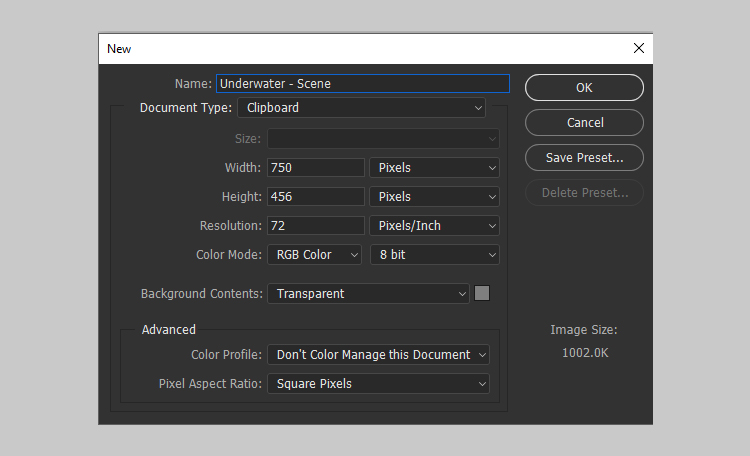
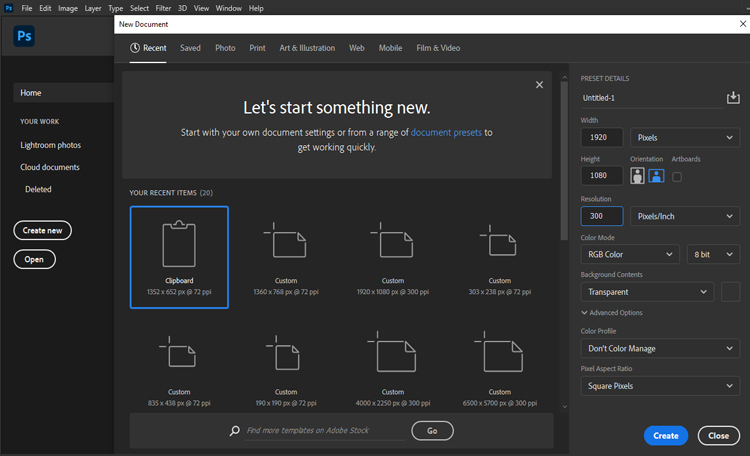
Create a new document in Photoshop with any size and orientation. You can use the same techniques for any canvas size.

For this example, I will use a 750 x 456 PX document with the settings below:
Step 2

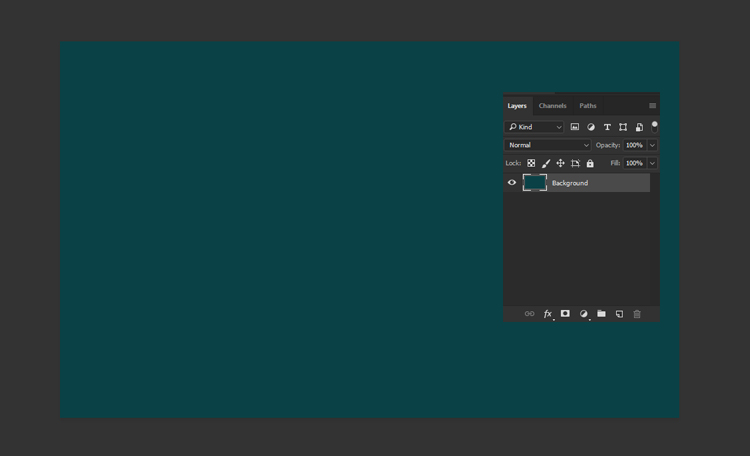
Create a new layer for the background and fill it with a green color #0a4146 using the Paint Bucket Tool (G). This will be the base color of the water.
Step 3

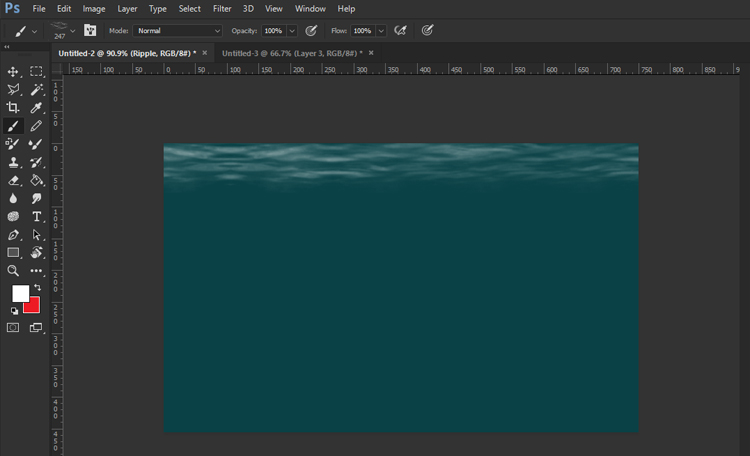
Next, you will create the top of the water using this Ocean Brush (you can find this brush and others in the underwater brushes pack). Create a new layer and name it Ripple. Paint the top of the water with a white color #ffffff using the Ocean Brush. Follow the direction of the waves as you paint.
Step 4

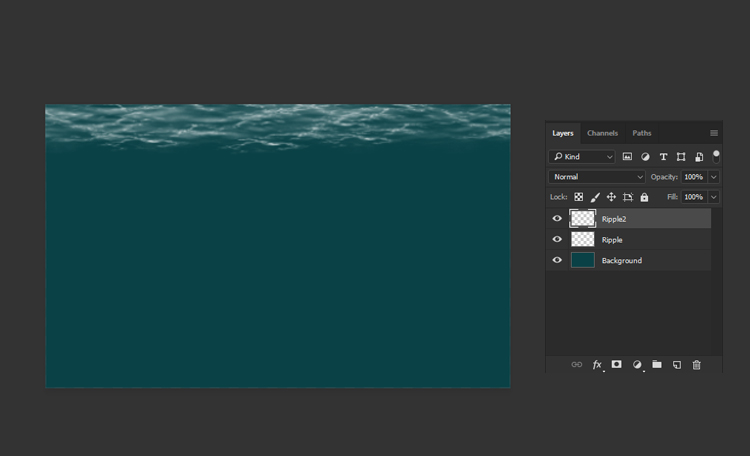
Create another layer and name it Ripple2. Place it above all the other layers. Use this brush to add some ripples to the water surface with a white color #ffffff. This will create a glowing effect for more realism.
Step 5

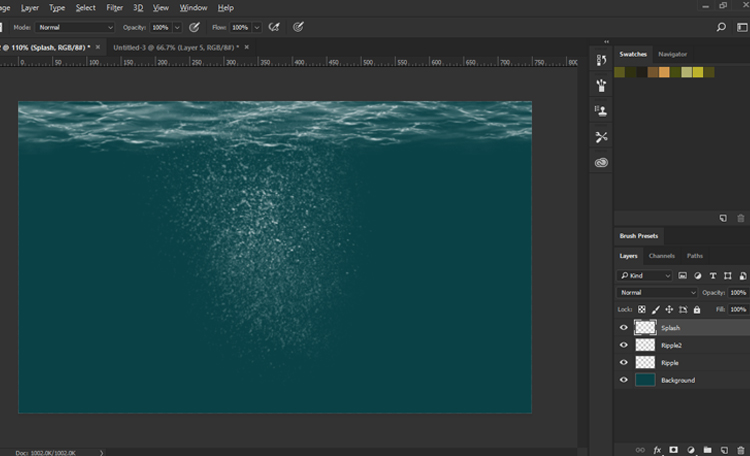
Now, you will create some splash water effects in Photoshop. Create a new layer and name it Splash. Use this Splash Brush to paint some falling water splashes with a white color #ffffff. You can vary the size and opacity of the brush to create different effects.
Step 6

Next, you will create the bottom of the water surface using this brush. Create a new layer and paint it with a white color #ffffff

This will create some highlights and reflections on the water.
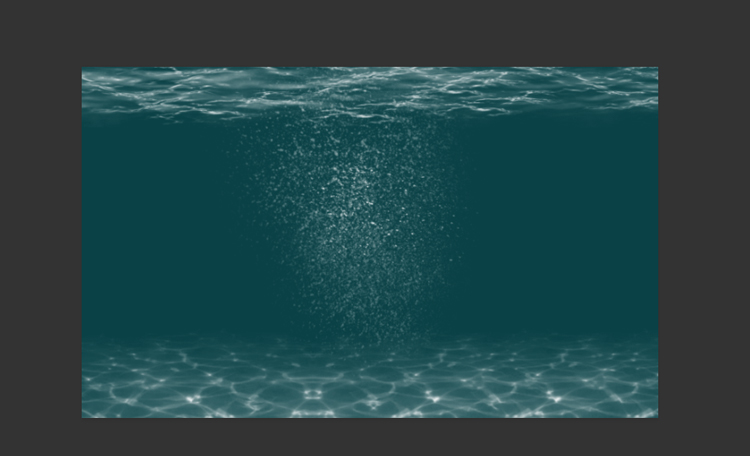
Step 7

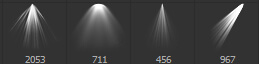
Finally, you will add some light rays to the underwater scene using this Light Brush. You will get 5 different brushes in the pack. You can use any of them. Create a new layer and paint some light rays with a white color #ffffff. You can adjust the size, opacity, and angle of the brush to create different effects.
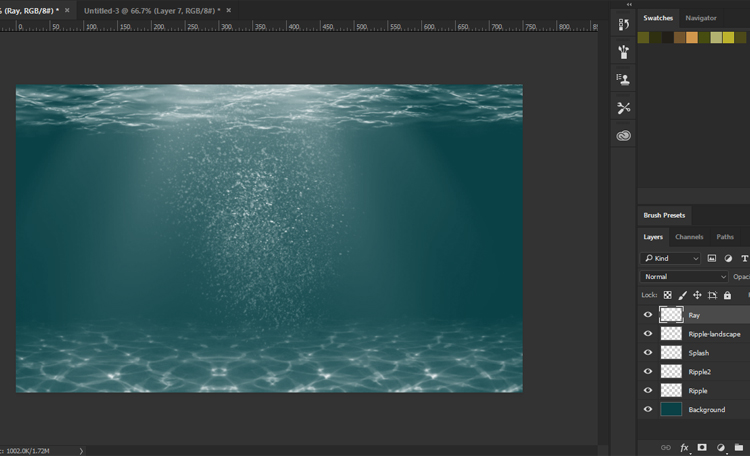
Congratulations, You’re Done!
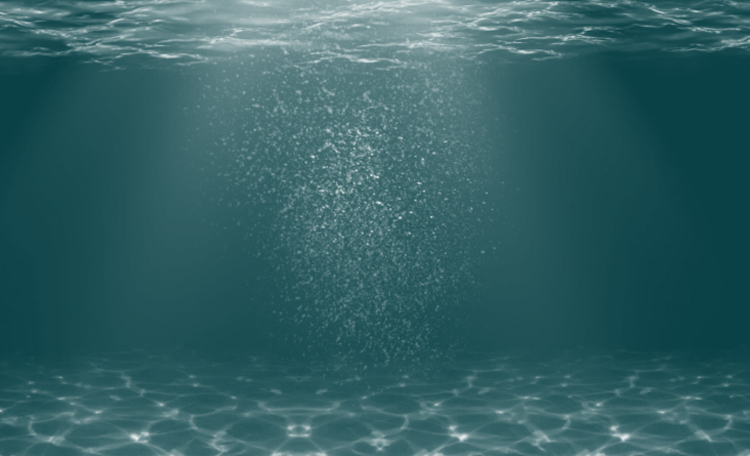
I hope you’ve enjoyed this tutorial and learned some new techniques. Enjoy!

How to install Photoshop Brushes

Installing Photoshop Brushes For (Photoshop CC 2020 and newer)

in This blog I will show you how to install Photoshop brushes.

This information applies to Adobe Photoshop CC 2019 through Photoshop 2022.
To get started, you’ll need to first download brushes for Photoshop, find your brush in our store

, and download our Photoshop brushes or brush pack you’ve chosen.
Launch Photoshop and create a new file or open an existing one!


how to install photoshop brushes


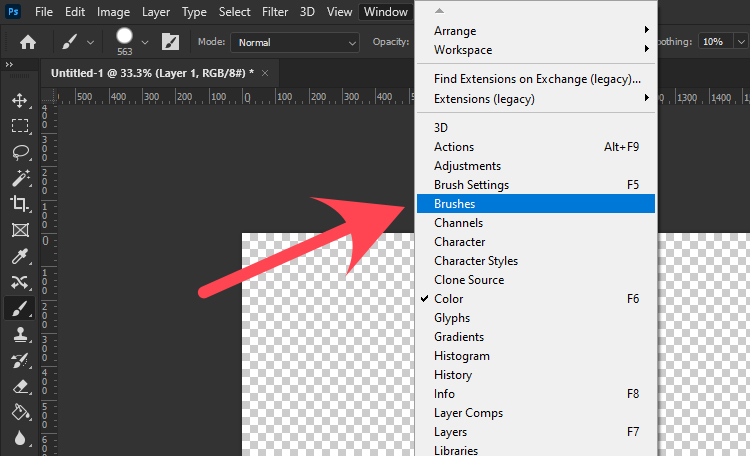
1. Open the Brushes panel, by going to Window > Brushes.


how to install photoshop brushes


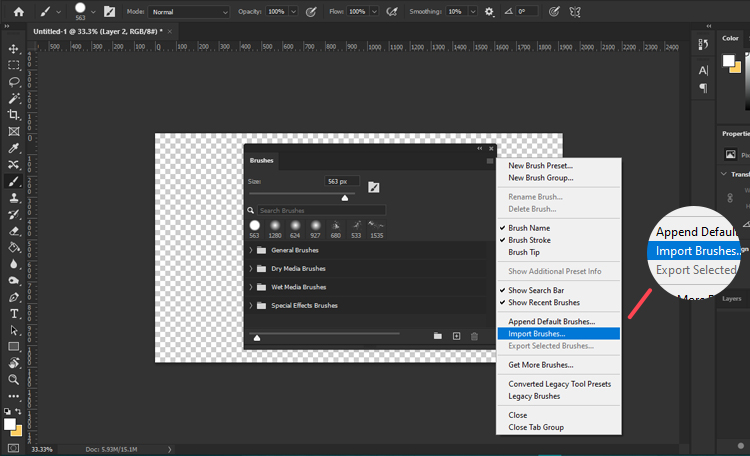
2. click the hamburger menu on the top right corner then click Import Brushes.


how to install photoshop brushes


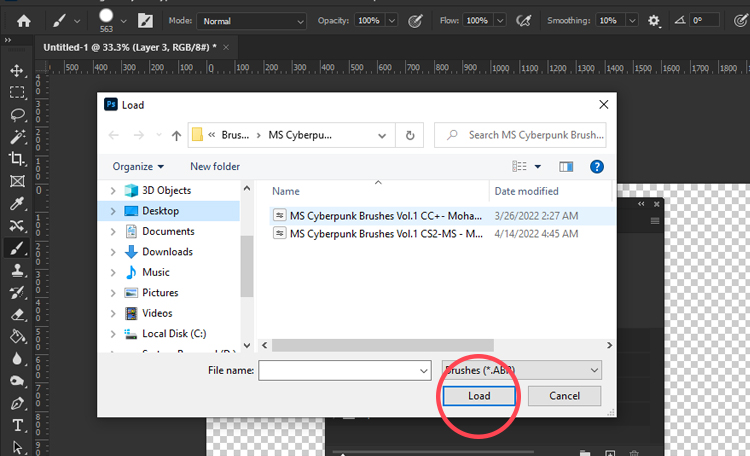
3. Locate your brush pack to select the ABR file of the brush pack.

4. then select “Load” button to insert them into Photoshop.


how to install photoshop brushes


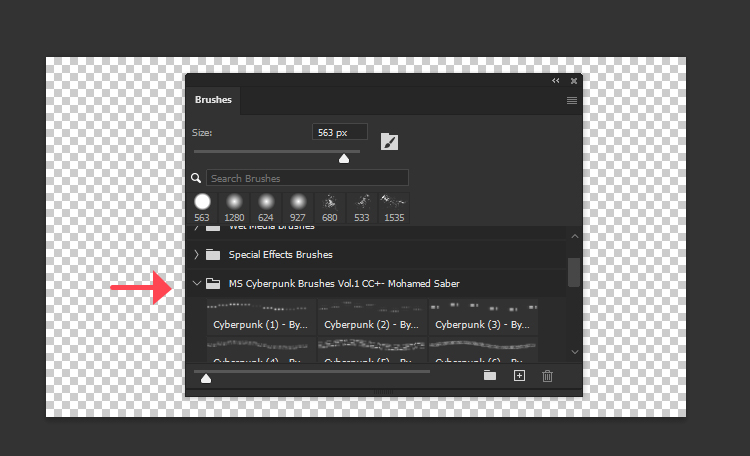
5.The new brush (or brush pack) displays in the Brushes window.

how to install photoshop brushes

How to install Photoshop Brushes in Older Photoshop Versions (CC 2019 and Older)

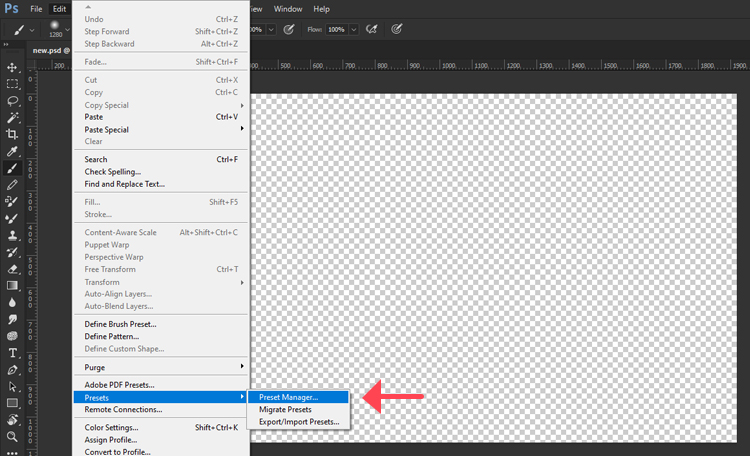
1. going to Edit > Presets > Preset Manager.

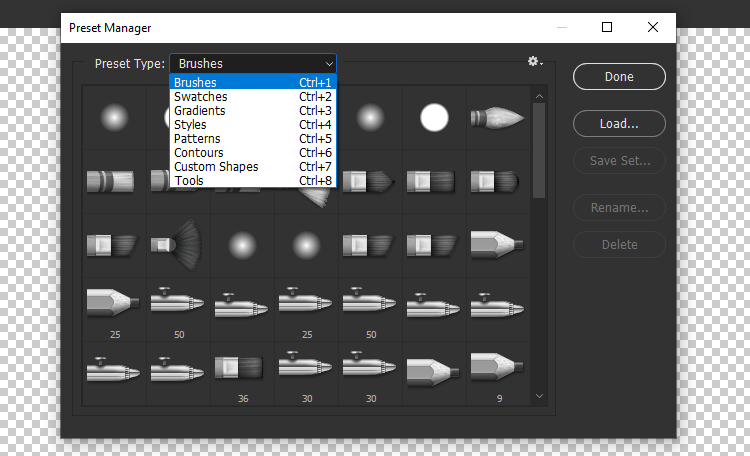
2.select from Preset Type menu “Brushes” or Ctrl+1(in keyboard).

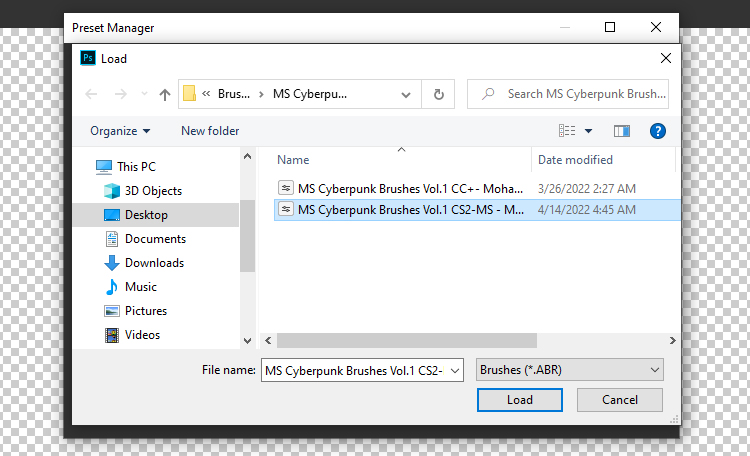
3.then select “Load” button to insert your brushes.

4.Locate your ABR file then Double Click ABR File

Enjoy!
read our blogs 

Easy Ways to get Reference Images

Some people think that reference images are used by beginner artists, but reference photos are used by creatives of all different skill levels right up to professionals, and across all mediums, including paintings, and sculpture.
You may have seen your favorite artists draw something from memory, but it requires years of practice to just use your imagination alone. But to be able to do so, you must use reference images first, a reference picture is an important guide for artists and there is a need for guidance for everyone. And I’ll show you some tips to get a photo reference that helps you get creative.

Collect Your References in One Place

you need to do to create a reference for your art. Then organize them in one place. This could be a folder on your pc or a Pinterest board. Make sure the photos you use are royalty-free and are free for commercial use.

look up references!

After I’ve finished developing my concept, I look up references that may be useful when creating my illustration.
Another part most beginners don’t pay attention to is the quality of photo references they choose to use for their work. Many sites have reference photos for artists, such as

Pexels

Pexels is a site that provides free stock photos and videos, all licensed under the Pexels license. These images are high quality and easy to search through.

Pixabay

Pixabay is a site that shares copyright-free images, videos, music, and illustrations. All of the content is released under the Pixabay License. This means the content is safe to use without permission or credit to the artist.

unsplash

All photos are under the Unsplash license and the photographers who upload images to Unsplash grant users a free copyright license to their work.
It can be easy to just search ‘reference images for drawing’ or look at your favorite pictures on Pinterest for inspiration
When looking for inspiration: look through a few photographs and try to recreate them by painting or drawing exactly as you see them.
see all Blogs

introduction to concept art

sketching is an important step in the creative process. This is especially true of visual arts like concept art, illustration and even design.
Having a sketchbook will help to keep your ideas fresh by sketching as often as possible.
Sketching is an important part of the artist’s daily routine that should be done multiple times per day, not just when inspiration strikes. Do not care too much about the tools, whether sketchbooks or pens. You can also create them digitally on Photoshop or other applications.
remember You can make more than one sketch of one concept as long as your artwork develops.
Sketchbooks are also a diary of your progress and see how your artistic skills improve over time is inspirational.

1. What is Concept Art

Concept art is a form of illustration used to convey an idea for use in artworks, films, video games, comic books, animation or other media before it is put into the final product. All usually become easier to create with digital art, you can take a variety of approaches, such as using brushes and textures to easily express texture.
You can see the sketches inside my gallery.

2. Where can Concept Art be found

Concept art can be seen abundantly in films, video games, Books, TV, graphic design. In addition, concept Artists produce general sketches or ideas of props, Environments or characters. So, concept art is a creative field that continues to grow in popularity.

3. start learning concept art

It is easy to start learning concept art because of its minimum requirements, you only need pencil and paper to translate your ideas into drawings, but you need to be a professional concept artist so you must know the basics of drawing and you can learn that through the Internet and training on it.


Easy Ways to Find your Art Inspiration

Sometimes you struggle to get ideas, because you think a lot about what you want to draw, at this moment.

we call that Creative Block , sounds like you need some inspiration.
So, you’ve decided that you want to be an artist, you need to train your brain to be inspired. I know it sucks. anyway, you can learn ways to get inspired and train yourself on them.
Here are some quick tips I have for finding inspiration.

1. Take a break

A designated area to work in is Important. Find a place where you can be creative. Start training your brain to pay attention to natural Places like the sea, foliage, sky and relax. Spend more time with friends/family. Stay away from your usual routine and take a break. I see a lot of beauty and creativity in the natural world, so I encourage you to spend some time in Natural places. A change of scenery or environment may rekindle your inspiration because you’re looking at new sights.

2. Build your Inspiration

Keeping work aside, inspiration can come from just about anywhere. so don’t limit yourself to just looking at other visual art.
Art inspiration on Pinterest can be found everywhere, it is a visual search engine, which makes the platform useful for artists.
One foolproof way to motivate yourself is to Search galleries and communities for artwork that you like. This is a great way to discover what really inspires you.

3.Network with Other Artists

Networking with other artists or influential people in the art world can further your opportunities for building your Art inspiration.
Networking and getting to know other artists in your career help you think more deeply about being inspired.

4. Join Art Communities

Visual Artists create pieces in a range of media, including Painting, sketching, and photography. Stay in touch or get in touch, follow up with what they are doing.
we’ll look at a few networks for Digital art that do more than your typical social media platform by inspiring.
Here are networks for digital artists that every artist should consider using to collaborate and work together online. Such as,

Deviantart , Artstation ,Behance

5. Watch Speed Painting for Inspiration

Watching Speed painting videos by other artists on YouTube can inspire you to create your art. also You can learn a new skill through a quick video that creates a passion for work.
Many Artists Are Inspired by Books. Books offer a wide range of subjects and stories as well, also I’ve found inspiration in a lot of Books and video games.

what’s the causes of creative block

creative block is a condition. when you’re feeling uninspired or art blocked, and that it’s hard to get motivated to create art, can be described as the inability to access one’s internal creativity.
Creative blocks can happen to professions: Artists, Writers, and Musicians are often more likely to be affected by creative blocks.
Take a look at the most common causes of the creative block!

1.Daily Routine

one of the most common reasons behind creative block is Daily Routine.
Repeating the same work every day with the same methods make stress.
Some artists can feel stifled by stress. Your daily routine can also affect your doses of inspiration greatly, take a break to allow you to create a space for inspiration.
One of the most effective tactics is to take a break from work and do something else for a while.

2. an abundance of ideas

Although the abundance of ideas is a beautiful thing sometimes the more ideas one has, the more overwhelming it can be. Because you will find it difficult to follow a specific idea from them.
sketching all of your ideas before choosing the one that produces the most excitement and joy.

3. issue in your life

Another one of the main causes of creative block has to do with one’s emotional state.
maybe a big personal issue going on in your life. This will affect your inspiration because you can’t have an idea while you’re worried, solve your issues first so that you can get rid of the creative block.

4. unorganized workplace

let’s me ask you What does your office space say about you?
Is it full of clutter and stacks of papers?
An organized workplace will give off more Positive energy and confidence. So, make sure your workplace is organized before work. which is essential for creativity.
Working in a clean, neat, and organized environment will relieve stress and help you to think clearer.
Conclusion: How to Keep Your Creative Mind Unblocked
I hope you found my article on how to overcome creative block as an artist useful. If you are stuck in a creative rut, I recommend reading my blog posts, they might just help you to find your inspiration.
Thank you for reading.

find our Blogs.
Find our artworks Gallery.